 By
By 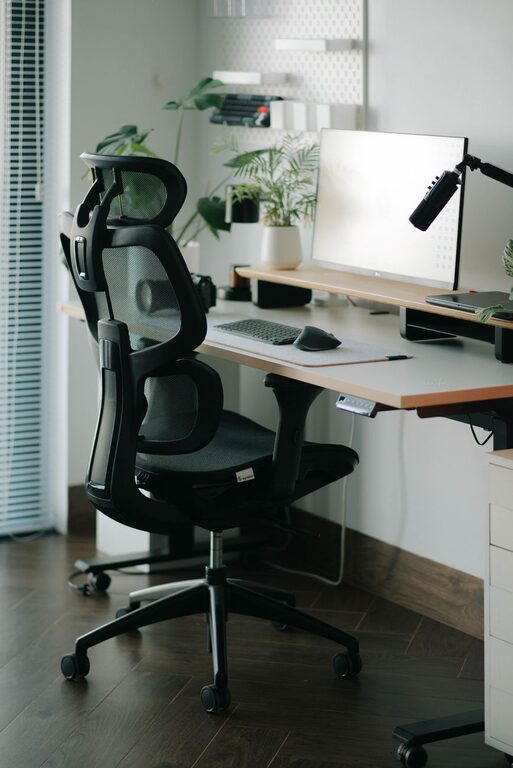
Creating an ideal desk setup can make a significant difference in your productivity and overall well-being. Whether you work from home or spend hours at an office desk, having a space designed for focus and comfort helps reduce distractions, minimize physical strain, and improve work quality. In this post, we will explore practical tips to optimize your desk setup for both comfort and focus.
Why a Proper Desk Setup Matters
A well-organized and ergonomic desk not only supports your body but also encourages mental clarity. Poor posture can lead to discomfort, headaches, and fatigue, while cluttered workspaces may distract you from tasks. By paying attention to how your desk is arranged and the tools you use, you can create an environment that supports sustained concentration and physical ease.
Choosing the Right Desk and Chair
Desk Height and Size
Start with a desk that fits your space and needs. The height of the desk should allow your arms to rest comfortably at a 90-degree angle while typing or writing. If the desk is too high or low, it can cause strain on your shoulders and wrists. Consider adjustable desks or desks with enough surface area to hold your computer, mouse, notebook, and other essentials without feeling cramped.
Ergonomic Chair
Your chair plays a crucial role in comfort. Select one that supports your lower back with adjustable height and lumbar support. Make sure your feet rest flat on the floor or on a footrest, and your knees are roughly level with your hips. Proper chair support helps prevent back pain and encourages a healthy posture.
Monitor Placement for Reduced Eye Strain
Position your monitor directly in front of you, about an arm’s length away. The top of the screen should be at or slightly below eye level. This setup encourages you to keep your neck straight and reduces the risk of neck and eye strain. If you use multiple monitors, angle them gently inward to minimize excessive head movement.
Lighting: Bright and Balanced
Good lighting can help reduce eye fatigue and improve focus. Whenever possible, place your desk near a source of natural light, but avoid glare on your screen by positioning windows to the side. Use a desk lamp with adjustable brightness to provide focused light on your work area for tasks such as reading or writing. Warm or neutral light is generally easier on the eyes compared to harsh fluorescent lighting.
Organizing Your Workspace for Efficiency
Declutter Regularly
Keep only essential items on your desk to reduce distractions. Use drawers, shelves, or organizers to store supplies like pens, notebooks, and cables. A clutter-free desk helps your mind stay clear.
Use Desk Organizers
Invest in trays, pen holders, or cable management solutions to keep items neatly arranged. Organizers make it easier to find what you need quickly, saving time and avoiding frustration.
Incorporate Personal Touches Wisely
While personalization can make your workspace pleasant, too many decorations may become distracting. Choose a few meaningful items like a photo, plant, or artwork that inspire you without overwhelming your desk.
Ergonomic Accessories to Enhance Comfort
– Keyboard and Mouse: Choose ergonomic or split keyboards and mice that support natural hand positioning.
– Wrist Rests: Use cushioned wrist rests to reduce pressure during typing.
– Footrests: If your feet don’t comfortably reach the floor, footrests help maintain proper posture.
– Laptop Stands: Elevate laptops with stands to align the screen better with your eye level, using an external keyboard and mouse when possible.
Establishing Workflow Zones
Design your desk area with specific zones for different activities to support focus:
– Primary Workspace: The central area for your computer and main tasks.
– Reference Area: A nearby space for documents or books you frequently use.
– Supply Zone: A section for stationary and tools within easy reach.
– Break Area: If space allows, a small spot for a cup of water or quick notes to encourage regular breaks.
Maintaining Good Habits for Long-Term Comfort
– Take Regular Breaks: Follow the 20-20-20 rule—every 20 minutes, look at something 20 feet away for at least 20 seconds to reduce eye strain.
– Adjust Your Posture: Periodically check and correct your posture throughout the day.
– Stay Hydrated: Keep a water bottle on your desk to encourage hydration.
– Stretch Often: Incorporate simple stretches or short walks to relieve muscle tension.
Final Thoughts
A desk setup tailored for focus and comfort blends ergonomic principles with personal preferences. By investing in the right furniture, organizing thoughtfully, and fostering good habits, you create a workspace that supports productivity and well-being. Start with small changes and adjust your setup as you learn what works best for you. Happy working!